What it does today
The desktop preview brings remote devices and local shells into the same workspace.
SSH
- Current cryptography first. Post-quantum key exchange (ML-KEM with X25519), strict key exchange, ChaCha20-Poly1305 and AES-GCM, Ed25519. No compression.
- Plain words about every connection. A Connection panel names each algorithm that was negotiated and rates it, shows the host key's fingerprint and where trust came from, and counts the bytes on the wire.
- Host keys you decide on. An unknown key is shown with its fingerprint: trust and save, trust once, or refuse. A changed key stops the connection and says so.
- Old equipment, deliberately. A device that offers only legacy algorithms is not connected silently. You are told what it offered and asked, once or always for that session.
- Sign-in the usual ways. An agent (the Windows OpenSSH agent or Pageant), key files with OpenSSH user certificates, keyboard-interactive and password, in the order the session sets. Prompts appear in the terminal; nothing typed at one is stored.
Telnet
Choose Telnet in Quick Connect for equipment that needs a cleartext terminal. The tab shows that the connection is unencrypted. Port 23 is the default. Telnet manual
Serial consoles
- A port finder that lists what is plugged in and puts the likely console cables first.
- Speed detection for when the label fell off the device.
- Every usual line setting, and Send Break.
- An unplugged cable is noticed and reported, not left as a silent tab.
Local shells
- PowerShell, Command Prompt and every WSL distribution by name, each in its own tab beside your remote sessions.
- Working folder, exit status and prompt marks from Bash, when its integration is on.
It does not leave you guessing
- Every wait has a limit: reaching the host, the SSH handshake, each step of signing in. Time you spend reading a fingerprint is never counted against the host.
- Every ending has a reason: closed by the host with its message, reset, lost, no answer to keep-alive messages. The whole list.
- Closing always works, whatever the session is waiting for.
- A short outage is survived. A link that drops out and comes back inside the keep-alive budget carries on, and nothing is lost.
It protects you from mistakes
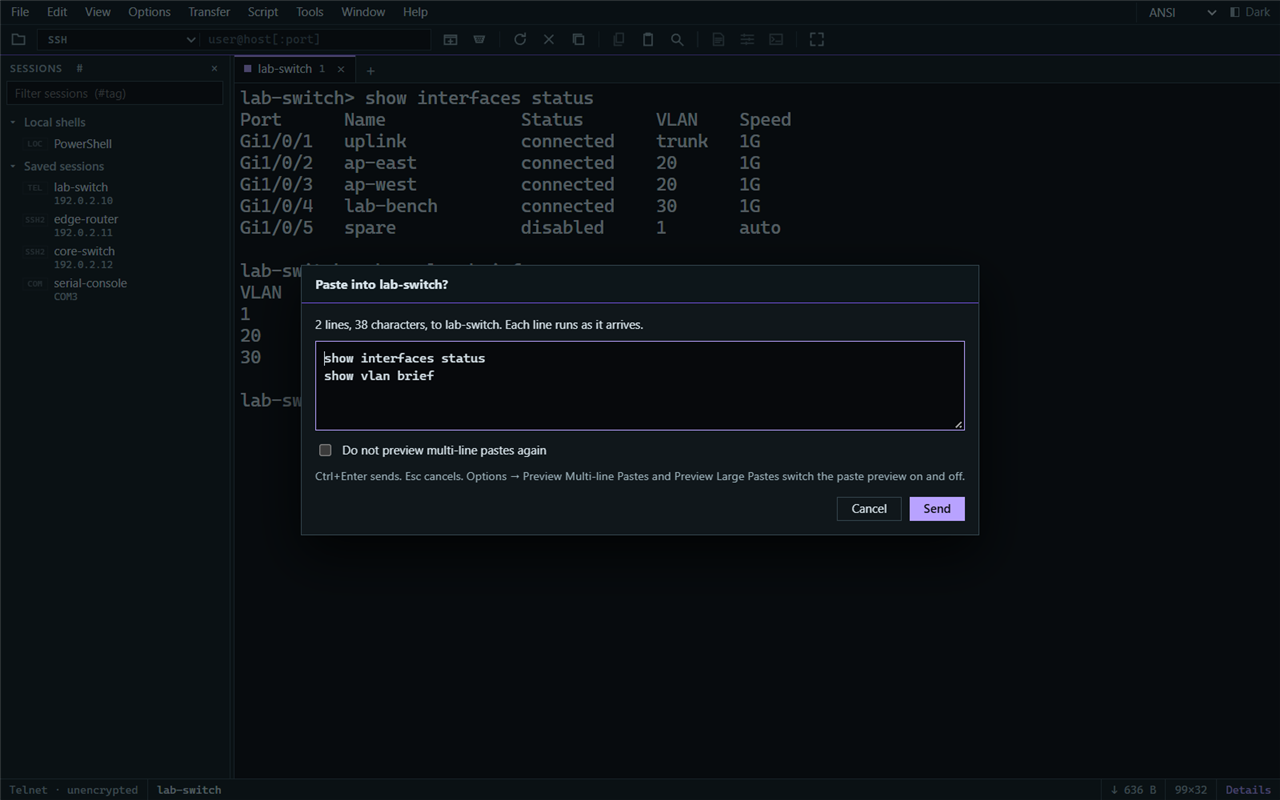
- Paste preview. Text with a line break, a control character, or more than 5,000 characters is shown first, editable. Ctrl+Enter sends; Enter only adds a line. How it works.
- Pastes of any size go through, including into equipment that accepts a few kilobytes at a time.
The window
Choose Classic for saved sessions and tab groups, Terminal for a focused shell, or Tiled for several visible panes. Switch with Ctrl+Shift+M. Explore the layouts.
- Keep the raw output from every terminal. Choose Start Tagged Session Log to label part of an investigation and save its output in a separate file while the session log continues. How session logging works
- Organize saved connections into folders, label them with tags, and use Find to search terminal output.
- Three looks, Dark, Grey and Light, each checked for contrast. Two green-screen displays: Phosphor, all in green, and CRT, green phosphor that keeps colour.
- Saved sessions from two widely used terminal programs are read in place, never changed.
Coming
These are being built. They are not in the program today.
| What | State |
|---|---|
| Automatic reconnect | Planned |
| File transfer on the session's own connection (SFTP, SCP) | Planned |
| Native Linux packages | Private DEB and RPM builds are in desktop testing. Platforms and availability. |
| macOS | Planned |
| Extensions by third parties | Planned |
rheaCRT Relay
Relay is a planned paid plugin for investigating a problem from the terminal where you found it.
Highlight a switch port’s status and ask Quick Ask, “Why is this port blocking?” If Relay suggests a diagnostic, you’ll see the exact command, the device it will reach and a warning about any expected impact. Choose Approve and run to see the result at the same prompt.
Choose Continue as task to carry your question and selected output into a longer investigation. Add yesterday’s and today’s switch configurations and ask which ports changed VLANs. Relay will give you a table with the relevant lines from each configuration.
For cloud analysis, rheaCRT will mask IP addresses, hostnames and logins on your computer and redact detected credentials. You’ll see exactly what your provider will receive. Relay licence details
Review a multiline paste
The preview names the destination and lets you edit the commands before sending. Here it is open over a demonstration Telnet session.